
Your Chat Response Time
What is the chat room response time?
Your chat response time shows how long your pharmacy typically takes to reply to a new patient message. Patients see it before they message you, so they know when to expect a reply. You see the same estimate in your chats.
Why does it matter?:
Patients who know when to expect a reply are less likely to get frustrated, send repeat messages, or call to follow up. A quick response time shows patients your pharmacy is easy to reach.
What the response time look like?
In your pharmacy dashboard chat
Here you can review your current response time.

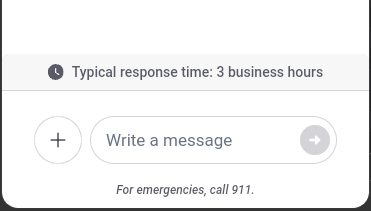
What your patients see
Here’s an example if your business average response time was 3 hours:
How it works
- It's based on how quickly your pharmacy has replied to new patient messages over the last 30 days.
- Time when your pharmacy is closed doesn't add to or increase the response time.
- If you've received only a few messages recently, no response time is shown.
- If your typical response time is longer than 3 days, it shows as "More than 3 days."
- It updates every few days, so improvements show up over time, not instantly.
How to improve your response time
- Check your chat often. Build chat checks into your routine, such as at opening, midday, and before close.
- Reply to new messages first. A quick "Got it, we're looking into this" counts as a response and lets the patient know they've been heard.
- Assign someone as reviewer. Assign a team member each shift to watch for new chats so messages don't slip through.