
Vaccine Season is Here!
Let patients know when vaccines are available at your pharmacy with Pharmacy Announcements — available at no additional cost.
Use Vaccine Announcements to promote:
- Flu vaccines
- COVID-19 vaccines
- RSV vaccines
- Shingles vaccines
- Seasonal vaccine clinics
- New vaccine availability
Why Send a Vaccine Announcement?
Patients may not know which vaccines your pharmacy offers or when they’re available.
A Vaccine Announcement gives you a simple way to reach your patient base and tell them:
- What vaccine is available
- When they can get it
- Whether they need an appointment
- What they should do next
A clear announcement can help drive awareness without requiring your team to individually contact patients.
What Will Patients Receive?
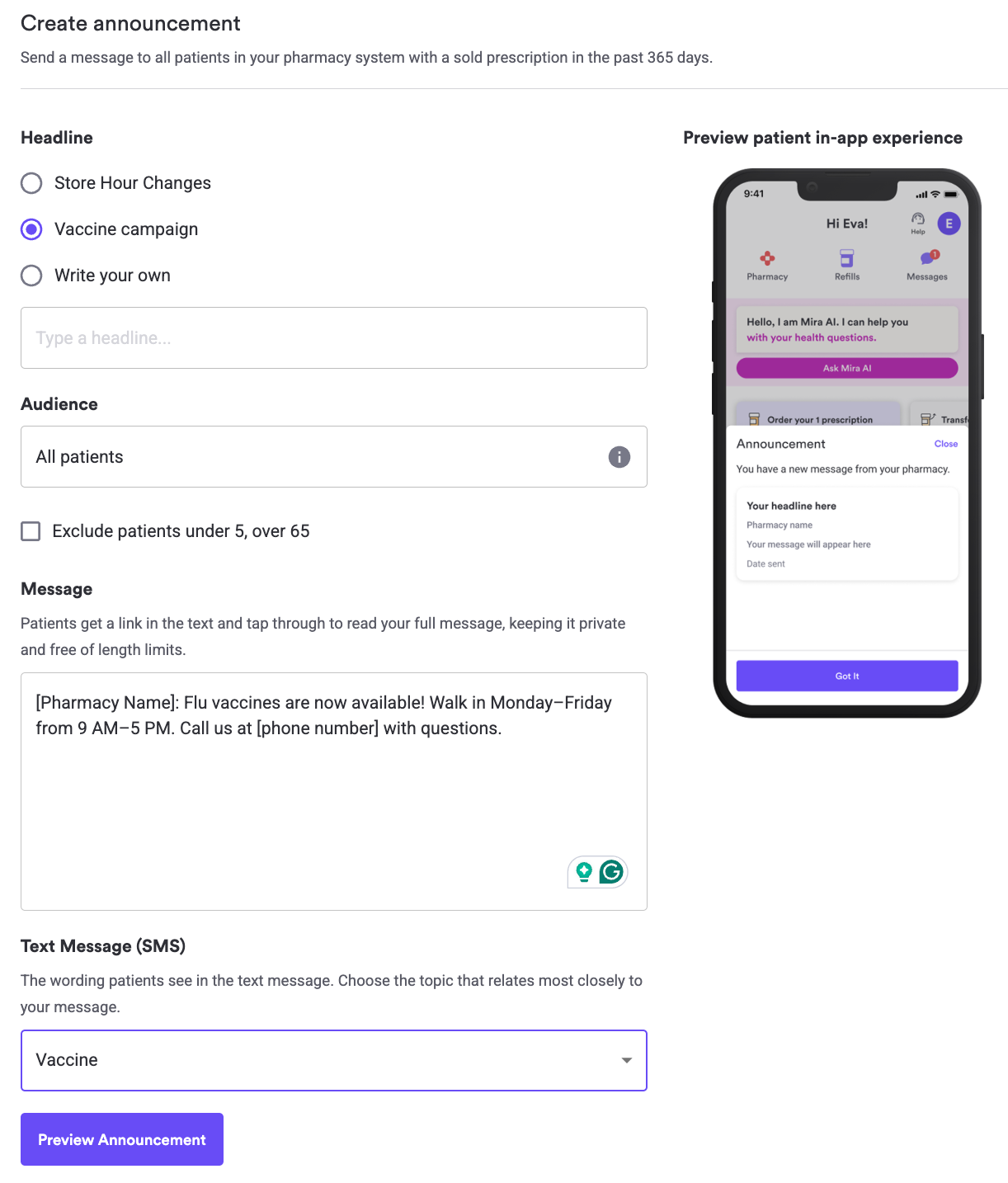
When you create an announcement, you’ll choose the SMS category that best matches your message. This influences the SMS copy so it will align making it clear you have a Vaccine Announcement.
Patients receive an SMS notification with a link to your full announcement. They can tap the link to see the complete message you wrote.
The announcement you write is not the exact SMS patients receive. The SMS category helps patients understand what type of message your pharmacy is sending before they open it.
For vaccine outreach, choose the category that best matches a vaccine or health-related announcement.
How to Send a Vaccine Announcement
- Go to Pharmacy Dashboard → Announcements.
- Write the vaccine announcement you want patients to see.
- Choose the SMS category that best matches your vaccine message.
- Review the number of eligible recipients.
- If applicable, use Age Suppression to exclude patients under 5 or over 65.
- Review your announcement.
- Send your announcement.
Once sent, announcements cannot be edited or recalled.
What Should I Include?
A strong vaccine announcement answers four questions:
What is available?
Name the vaccine or vaccines you’re offering.
Who is it for?
Include eligibility information when appropriate.
When can patients get it?
Share walk-in hours, clinic dates, or availability.
What should the patient do next?
Tell them whether to walk in, call your pharmacy, or schedule an appointment.
Vaccine Announcement Examples
Walk-In Vaccines
"[Pharmacy Name]: Flu vaccines are now available! Walk in Monday–Friday from 9 AM–5 PM. Call us at [phone number] with questions."
Appointment Required
"[Pharmacy Name]: Flu vaccines are now available. Call us at [phone number] to schedule your vaccination."
Multiple Vaccines Available
"[Pharmacy Name]: Flu, COVID-19, and RSV vaccines are now available. Call us at [phone number] to learn more or schedule an appointment."
Vaccine Clinic
"[Pharmacy Name]: Join us for our flu vaccine clinic on [date] from [time]. Walk-ins are welcome. Call [phone number] with questions."
Tips for a Great Vaccine Announcement
Keep it short and put the most important information first.
Use a clear next step such as:
- Walk in today
- Call us to schedule
- Visit us Monday–Friday
- Contact us to learn more
Avoid unnecessary background information that makes the announcement harder to scan.
And remember: Announcements are broadcast messages. Do not include patient names, medications, dosages, or other Protected Health Information (PHI).
Frequently Asked Questions
Does it cost anything to send a Vaccine Announcement?
No. Pharmacy Announcements are available at no additional cost.
Does the patient receive my full vaccine message in the SMS?
No. Patients receive an SMS notification with a link to your full announcement. They can tap the link to read the message you created.
Which SMS category should I choose?
Choose the category that most closely matches a vaccine or health-related announcement.
Can I send an announcement about more than one vaccine?
Yes. Just make sure the message stays easy to scan and gives patients a clear next step.
Can I target specific age groups?
If appropriate for your campaign, you can use Age Suppression to exclude patients under 5 or over 65.
Can I edit a Vaccine Announcement after sending it?
No. Review your announcement carefully before confirming.
Where can I view what was sent?
You can view this in the Communication Center