
Better Control Over Your Refill Requests
We’ve made an update to ensure that your pharmacy’s specific rules are always followed. You can now be confident that prescriptions you’ve chosen to exclude from Nimble will never trigger automated refill messages or requests.
What is the update?
Many pharmacies have certain prescriptions, such as those for facility patients or specific NDCs (high-cost specialty drugs) that they prefer to handle manually. We use a rule called "Not for Nimble" (NFN) to flag these.
By default, any prescription marked as NFN is now completely ineligible for the Nimble refill experience.
This ensures:
- Total Exclusion: These prescriptions are blocked from all automated refill workflows.
- No Unintended Messages: Patients will not receive refill reminders for these specific items.
- No Accidental Requests: Patients cannot request refills for these items through the app.
- Cleaner Workflow: Your staff won't see refill requests in your system for medications you want to manage yourself.
How it Works
When a medication is excluded, the Nimble app clearly informs the patient so there is no confusion.
- In the App: Patients will see the prescription listed, but it will clearly state it is "This pharmacy does not support online refills for this prescription."
- Next Steps: The app will direct the patient to contact your pharmacy directly if they need a refill for that specific medication.
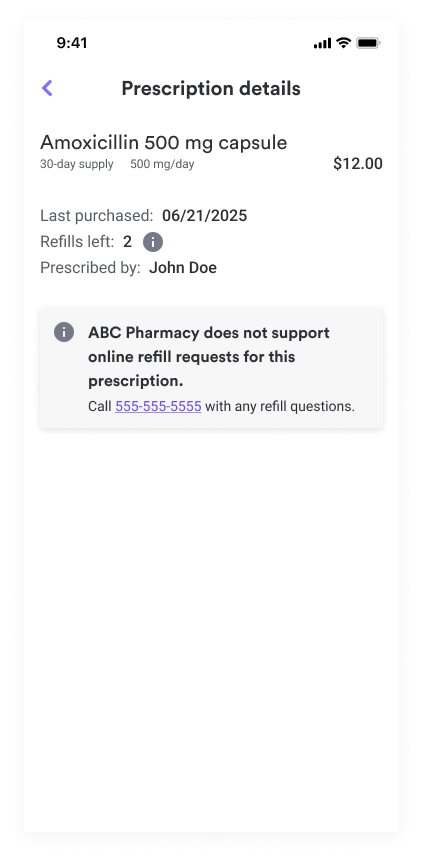
One quick tip on timing:
The system "tags" a prescription based on the rules active at the moment the label is printed and the medication is marked Ready for Sale.
- If you add a new exclusion rule today, it will apply to all new orders you fill from this point forward.
- Any bottles already sitting on your "Ready" shelf from yesterday might still send one final reminder before the new rule takes over.
Frequently Asked Questions (FAQs)
How do I add a medication or facility to my "Excluded" list?
If there are specific drugs (NDCs), doctors, or facilities you want to keep off the Nimble platform, simply contact your Customer Partner. They can update your rules in the background to make sure those items are blocked by default.
Will this stop refills for all my patients?
No. This only affects the specific items you have asked us to exclude. Your standard daily prescriptions will still get the helpful automated reminders that keep your patients on track.
What if a patient calls and is confused why they can't refill a specific drug in the app?
You can simply let them know that for that specific medication (like a facility-governed prescription), your pharmacy requires a phone call or manual check to ensure the best care.