
Managing Your Fax Settings
We are giving you more control over your pharmacy’s workflow. You can now manage your own fax notification settings directly in the Pharmacy Dashboard.
Previously, you had to call our team to turn faxes on or off or to update your fax number. Now, you can make these changes instantly, whenever you need to.
What is the Update?
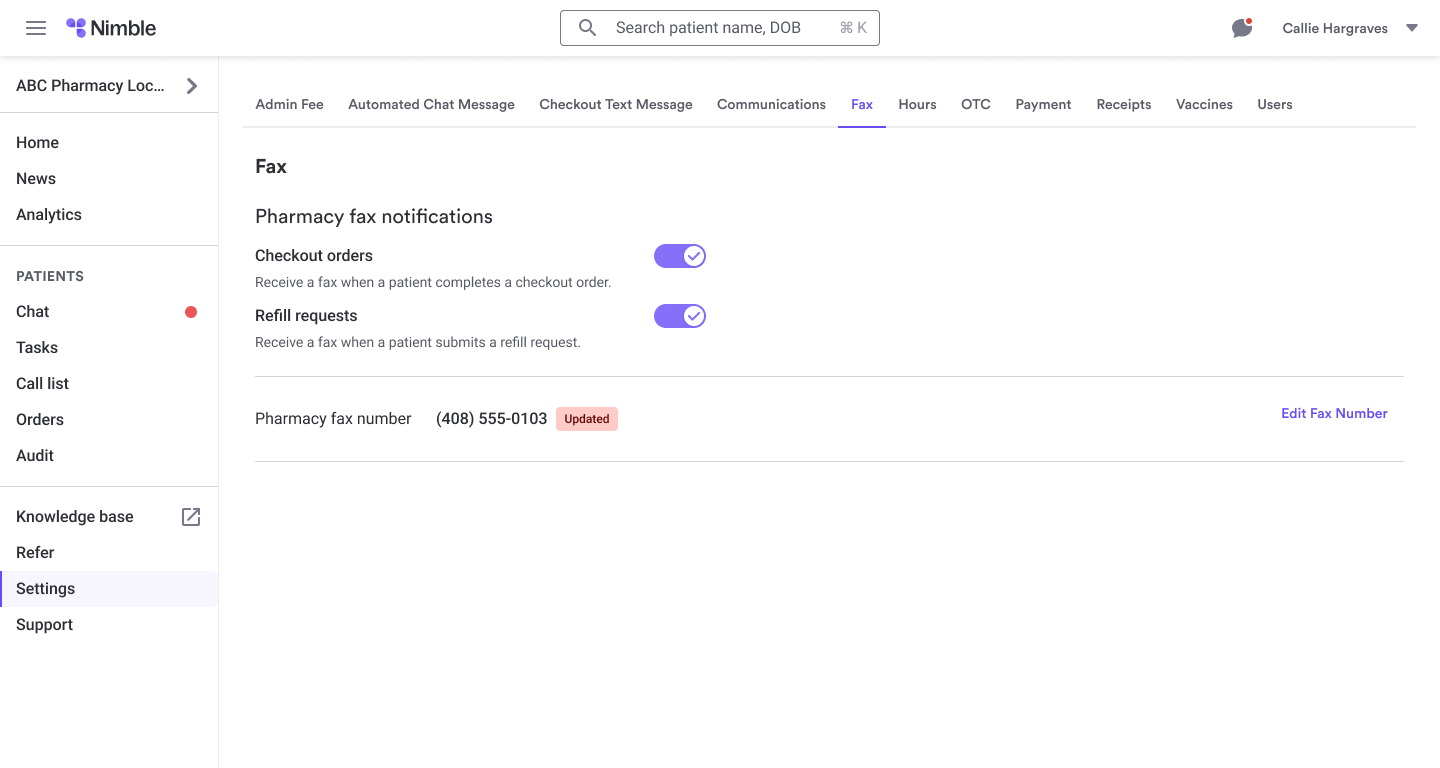
Under your Dashboard Settings, you will see a new section called Fax Settings. Here, you can decide exactly how you want to receive notifications for different types of tasks.
With this new tool, you can:
- Update Your Fax Number: Change your destination fax number at any time.
- Control Checkout Faxes: Choose to receive a fax for every pickup and delivery order.
- Control Refill Faxes: Choose to receive a fax for new refill requests.
How to Use Fax Settings (Step-by-Step)
Note: Only Pharmacy Owners and Pharmacists-in-Charge (PICs) can access these settings.
Step 1: Open Settings
Log in to your Pharmacy Dashboard and click the Settings icon in the sidebar.
Step 2: Select Fax Settings
Click the new Fax Settings tab. You will see your current fax number and two toggles.
Step 3: Enter Your Fax Number
If you are setting this up for the first time or updating your number, type the new number into the Fax Number field.
- Tip: You cannot turn on faxes until a valid number is saved.
Step 4: Toggle Your Notifications
- Checkout Orders: Turn this ON if you want a fax for every order completed by a patient.
- Refill Requests: Turn this ON if you want a fax for every refill request. (If you use Dash-lite to receive refills directly in your PMS, you may want to keep this OFF to avoid duplicates.)
Step 5: Save
Confirm your changes. Your new settings take effect immediately!
Frequently Asked Questions (FAQs)
Why are my toggles "greyed out" or unclickable?
You must enter a fax number first! The system won't let you turn on notifications until it knows where to send them.
I’m a staff member; why can't I see Fax Settings?
To protect your pharmacy's configuration, only users with "Owner" or "PIC" roles can change these settings.
Should I turn on "Refill Request" faxes if I use PioneerRx or BestRx?
If your refills already drop directly into your PMS queue, you likely don’t need a fax too. Most pharmacies in this setup leave Refill Faxes OFF but keep Checkout Faxes ON.
What if I make a mistake?
You can change your settings as many times as you like. If you turn something off by accident, just go back into the dashboard and toggle it back on.